
My entry for this week’s IF topic is from the current book I am working on.

Little LuLu was “grounded” for coloring on the cat! 😉
Lorraine Dey
My entry for this week’s IF topic is from the current book I am working on.
Little LuLu was “grounded” for coloring on the cat! 😉
Lorraine Dey
I am taking on another book project. I am currently sketching out the page illustrations for a book I am working on. It features “Jodie”, a little tiger cat that has no stripes!?! This sketch from the preliminary pages is perfect for this week’s IF image. The topic is “Separated”. Look for more on Jodie coming very soon. 🙂

Look for more on “Jodie” and the new book…”My Cat Wears Blue” by Lorraine Dey.
Happy Holidays! Thanks for stopping in. 🙂
Lorraine
I’m working on my B&W art style…
First, I have to say how sorry I am that I have neglected this blog for way too long. I am going to change up the format a little so that it is a easier for me to make regular posts. I will be posting my work in progress, my “Illustration Friday” entries, and news and updates as far as my work and publication efforts go.
This week’s IF image is for the subject “Brigade”. Click on image to view it at a larger size.
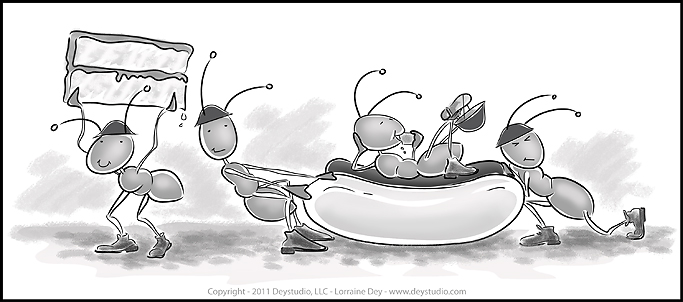
I may add interesting things that I have learned in this industry and helpful tips for other illustrators from time to time, but I will be turning my efforts over to my drawing table. I will also be posting sketches that are in progress, letting you in on current projects, and upcoming new projects. I hope you will keep coming back, and please feel free to comment!! 😉 Happy Holidays!
Lorraine Dey – author/illustrator
Since I began promoting myself in the area of Children’s Book Illustration, I have had a number of people inquire about providing illustrations for their “book that they have written and always wanted to publish”. I decided to put together some resource information for this month’s topic to shed some light on the process a picture book illustrator may go through.

I hope to also dispell the myth that as a writer you need to hire an artist and have the illustrations completed to submit along with your written manuscript. Here’s what I tell people that ask me about illustrating a book they are interested in getting published… “Send the manuscript to the publisher, without illustrations. It will be judged on it’s own merit and if the publisher is interested, they will find an illustrator that fits the project, …that’s just how it’s done”.
Instead of going into any more detail, there is a great article on that subject here at Harold Underdown’s site, The Purple Crayon
Since publishers are looking to match-up illustrators with manuscripts that they like, an illustration project for a picture book will most-likely come directly from an editor or art director at a publishing house. The publisher may send a manuscript to several illustrators at the same time and ask for a sample page or two in order to select the exact style they are looking for. At that point they will narrow their selection down to one illustrator.
Once they decide on an illustrator, a contract is drawn up between the illustrator and publisher containing details of due dates, royalties, etc. If you don’t have an agent working with you on this it is a good idea to have an IP, (intelectual property) attorney take a look at it for you. Once all the legal stuff is out of the way the illustrator starts sketching and preparing a sketch “dummy” of the book. It’s a rough mini-version of the book page layout. This helps to see how the book flows from page to page and helps in laying out color and text position. Make sure to check with the publisher for specifics on the book size dimensions and how many pages, etc. Typically that is around 28-32 pages with between 500-800 words for a picture book, (max is 1000). Rough sketches of the page spreads are submitted to the publisher first before any color work is started. Once you get the go-ahead on the sketches, it’s time to add the color. Here is a bit more information and sample layout of the pages for a picture book from Kathy Temean’s blog.

From “A Sweater for Duncan” – To be published by Raven Tree Press .
Personally, I like to add one more step in there and do a “color” rough that shows the publisher what you have in mind. The color mock up shown at the beginning of this article was put together using print-outs of the color roughs that were sent to the publisher. I use this mock up, (complete with numbered pages) throughout the entire time I am working on the final illustrations in order to keep everything organized. Once the illustrations are finalized and sent to the publisher, you can be sure there will be some changes, (much easier to do if you are working digitally). The publisher then produces the book, usually within about 6 months to a year. You can be sure I will post the announcement here when “A Sweater for Duncan” is released next Fall. 🙂
See all current news and release date info. for “A Sweater for Duncan”

click on image above to get a PDF file.
I came across Sahin Ersoz website several years ago and find myself still going back for a visit every so often. I love his style of characters and animation. He has done several Disney projects. Enjoy… be sure to check out the sketches!
One of the first things I can tell you if you are planning on going digital with your illustration abilities is to make sure your computer can handle the amount of space needed for large graphic files. They become huge very quickly, especially if you are painting raster images, (explained later in this article).
I also recommend getting a tablet and pen such as the Wacom tablet. (http://www.wacom.com) Though that is not necessary to create your art digitally, it does make the transition a bit easier especially if you are a painter. It also helps to have a good scanner. One that can get you scans of at least 300 dpi resolution. There is a good link for setting up a Wacom tablet here… http://www.gomediazine.com/design-tip/set-wacom-awesome-results/
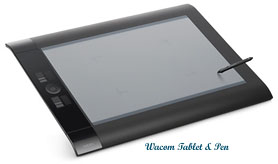
Wacom Tablet & Pen
There are several ways to produce digital illustration. 3d modeling programs are usually the first to come to mind however if you have been painting and drawing traditionally and have no time to learn a 3d program, you may want to try painting directly in Adobe Photoshop, (http://www.adobe.com) or creating vector illustrations directly in a drawing program such as Adobe Illustrator. I mention these programs because these are the ones I use. There are many different programs to choose from and the preference is up to you, although the Adobe CS programs are the most popular in the industry. The two prominent styles to work digitally in are…
Vector illustration: (Adobe Illustrator or similar drawing program)
Raster illustration:(Adobe Photoshop or similar photo/painting program)
What is the difference between vector and raster digital Illustration?
Below you will see examples of the two different styles… I begin with a pencil sketch that is scanned into the computer as a B&W jpg file, then I place it on the page in the program file that I am working on and begin to work over the top of the sketch adding color and layers as I go.
Scalable Vector graphics, (SVG) are created in drawing programs such as Adobe Illustrator and have a clean smooth line or curve. They are made up of solid or gradient color fills and can be scaled to any size and retain the quality of the image for reproduction purposes. It is a much smaller file size than a raster image and can easily be sent via email. These bitmap graphics are usually files with extensions such as .EPS, .AI, BMP, .PDF

Rasterized, pixelated images are usually created in a photo-editing program such as Adobe Photoshop and can also include manipulated photographs. The digital illustration done in a raster style is made up of very tiny squares called pixels. My raster images are usually more painterly with a broader range of effects and brushes available in the Photoshop pallet, (a favorite brush of mine is #63). This file tends to be larger than the vector art file. These are usually files with extensions such as .PSD, .TIFF, .JPG
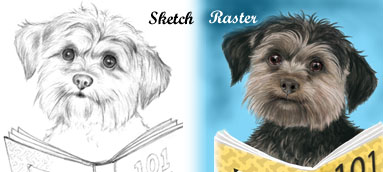
As you can see, I have started out with a scanned image of my original pencil sketch in the images shown above. In the next sample I will show you a raster illustration that was done completely in Adobe Photoshop from start to finish without the sketch as a starting point. I start out with basic solid shapes and then add color with the use of Photoshop brushes. The final image shows a detailed area of the bacon strip illustration.

Digital Raster Bacon Illustration
Once the illustration is complete you can save the file with a CMYK color mode for reproduction purposes.
AN ADDED NOTE, (from my software engineer brother Rob):
“A BMP file is not a vector image (it’s an abbreviation for bitmap). To help clarify, a vector file is simply a text file that states where and how to draw each line (from x,y to x,y coordinates). These are easily scaled to a new size, by using a multiplier on ALL the coordinates. A raster file contains a binary value to define the color for each pixel (or bit) in the image (or map). These files don’t scale at all properly, but one technique is to use the same pixel 4 times to double the image size (for upscaling, pixels are copied, so the perceived resolution doesn’t really change, it appears to us as larger pixels, even though there are more pixels). Downscaling just removes pixels, which usually makes the image look worse. I don’t think a PDF file is vector or raster. The PDF format is proprietary, and is intended to print the same on any printer, which is not normally possible with raster and vector files”.

click on image above to get a PDF file.


 Artist and Illustrator